Hello!
This video is an animation I made for a competition by cashstore.fr on the platform eyeka. People were asked to make videos to explain what cashback is and associate the concept to the website. I made two animations, which surprised my very own self. They're talking french, but I suppose you guys are more interested in the animation. Maybe I'll try to add english subs later. Thanks for reading and watching. Ciao.
Tuesday, August 18, 2009

Call for creation:::Philips Electronics
Here's an animation I made for a competition launched by philips on the platform eyeka. It was for the promotion of the new MP3 players Gogear line. The slogan was "Let your ears decide". Actually, my first idea was for a filmed movie, but I hadn't the GoGear so I decided, 20 days from the end, to quickly make an animation. So did I, but the big deal is the video was rejected beacause I did not use right free music. Doesn't matter, it allowed me to test the free rigging solution puppetShop. Ok, take a look and thanks for reading.
ciao
ciao
Call for creation:::Hotel F1
Hi everyone,
Happy to be there today.
During the last months, I used to make 3D animations for calls for creations. The following one wasn't finished, I had not enough time. It was for an hotel and was about all things one can do on a trip if the hotel is cheap. Yeah, this is announcement lol!
Happy to be there today.
During the last months, I used to make 3D animations for calls for creations. The following one wasn't finished, I had not enough time. It was for an hotel and was about all things one can do on a trip if the hotel is cheap. Yeah, this is announcement lol!
Monday, August 17, 2009
Words on strike
Hi everybody
I read a little story long time ago, when I was like 8 or 9. I can't say why, but sixteen years later I could remind that story. It's from the french author Peirre Gamara; It is about words going out of books and I found it funny so I decided to make a short movie with this story. I did it just after "The talkative frog" so they look somehow the same. As for "The talkative Frog", I made all the voices myself :-D
I tried to add youtube's annotations as english subs.
Ok, thanks for reading and watching
ciao
I read a little story long time ago, when I was like 8 or 9. I can't say why, but sixteen years later I could remind that story. It's from the french author Peirre Gamara; It is about words going out of books and I found it funny so I decided to make a short movie with this story. I did it just after "The talkative frog" so they look somehow the same. As for "The talkative Frog", I made all the voices myself :-D
I tried to add youtube's annotations as english subs.
Ok, thanks for reading and watching
ciao
Sunday, August 16, 2009
Human head modelling
Hello everyone,
In this post, I go throw the modelling of a human head. I intend to write it like a making of or a mini-tutorial. What will be covered is: setting the references images, modelling, mapping and texturing. Hope it'll will be useful.
Part I: guide setting (reference images)
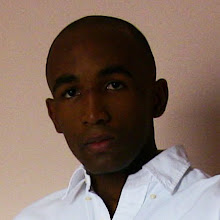
I take several shots of "the model", from two points of view.


Then, I choose the best picture and go under photoshop. There will be a need for lens correction, so I managed to get some straight lines behind the model, so I can retrieve the lens correction settings for the camera I used. the "remove distortion" value I used was 20.
I chose two picture and lined them up:
Now I go ahead and try to draw the flow of the future polygons; this can help to go faster at the modeling stage, and prevent bad topologies.
I draw my lines with the Pen tool.

There are two triangles in my topology. I stroke the paths an then, with the eraser and the pencil, I correct the topology to eliminate the triangles.

I saved three files, the side, the front with topology drawn and the simple front.
PartII: MODELING
Next I jump to 3dsmax, make a small plane in the front view and convert it to "editable poly".
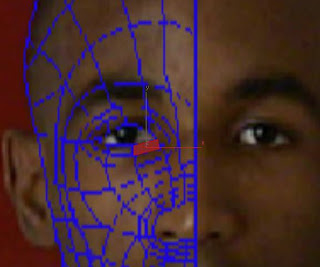
Then I extrude edges to match my drawn topology in the front viewport. It results in a flat geometry, to wich I'll try to add volume in the left viewport.
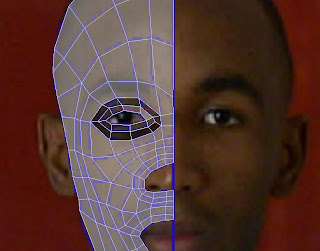
I set the viewports layout to 2 view (views menu->viewport configuration->layout) and move vertices to match the side picture. To help me in this, I go in the "object properties" (right-click on the object) and turn visibility to a low value (like 0.1).
I get something like this.
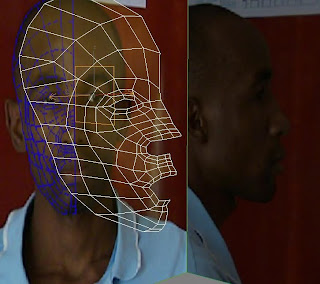
We're now going to add the nose and the mouth. This step is a bit fussy, because eyes, mouth and nose are important items of the face. Some people can be recognized just by those three shapes. So if one is messed, the whole model is messed. Ok, let's go head and begin with the nose.
I select the 3 first edges of the border of the nose, and bridge them with 5 steps.

I toggle to "border subObject" selection and cap the remaining hole. I make some little "Cut" on edges and I move vertices to shape the nose. I added a symmetry modifier above the "editable poly".

Ok, we'll do the nostrils later. We jump now to the mouth. I select the 3 first vertices and bidge them with 4 steps.

Ditto, I go into "border subObject" mode and cap the hole; I make 2 "cut". Then I move vertices to shape the lips.
I needed an extra loop of edges for the lower lip. I was hesitating to let it for later so I don't have a lot of details now in case I need a big refining. I finally go head and add the loop. I make a last cut and move the vertices.
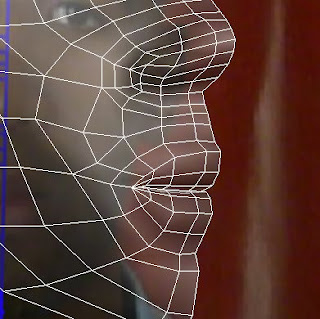
We'll make the inside of the mouth later.
Ok, I think we can deal with the eyes now. I would usually make a sphere to shape the contour of the eye around it, but I have a finished eye, so I merged it. I move the vertices, and then extrude the edges of the eye's hole inward twice; move vertices as usual. After that, I select the bordering loop and "chamfer" them with a low value, in "local normal" mode.

I moved some vertices on the chin by the way.

Now I need to close the back of the head, add nostrils, inner mouth and ears, but I'll do this next Sunday.
Cheers!
In this post, I go throw the modelling of a human head. I intend to write it like a making of or a mini-tutorial. What will be covered is: setting the references images, modelling, mapping and texturing. Hope it'll will be useful.
Part I: guide setting (reference images)
I take several shots of "the model", from two points of view.


Then, I choose the best picture and go under photoshop. There will be a need for lens correction, so I managed to get some straight lines behind the model, so I can retrieve the lens correction settings for the camera I used. the "remove distortion" value I used was 20.
I chose two picture and lined them up:

Now I go ahead and try to draw the flow of the future polygons; this can help to go faster at the modeling stage, and prevent bad topologies.
I draw my lines with the Pen tool.

There are two triangles in my topology. I stroke the paths an then, with the eraser and the pencil, I correct the topology to eliminate the triangles.

I saved three files, the side, the front with topology drawn and the simple front.
PartII: MODELING
Next I jump to 3dsmax, make a small plane in the front view and convert it to "editable poly".

Then I extrude edges to match my drawn topology in the front viewport. It results in a flat geometry, to wich I'll try to add volume in the left viewport.

I set the viewports layout to 2 view (views menu->viewport configuration->layout) and move vertices to match the side picture. To help me in this, I go in the "object properties" (right-click on the object) and turn visibility to a low value (like 0.1).
I get something like this.

We're now going to add the nose and the mouth. This step is a bit fussy, because eyes, mouth and nose are important items of the face. Some people can be recognized just by those three shapes. So if one is messed, the whole model is messed. Ok, let's go head and begin with the nose.
I select the 3 first edges of the border of the nose, and bridge them with 5 steps.

I toggle to "border subObject" selection and cap the remaining hole. I make some little "Cut" on edges and I move vertices to shape the nose. I added a symmetry modifier above the "editable poly".

Ok, we'll do the nostrils later. We jump now to the mouth. I select the 3 first vertices and bidge them with 4 steps.

Ditto, I go into "border subObject" mode and cap the hole; I make 2 "cut". Then I move vertices to shape the lips.
I needed an extra loop of edges for the lower lip. I was hesitating to let it for later so I don't have a lot of details now in case I need a big refining. I finally go head and add the loop. I make a last cut and move the vertices.

We'll make the inside of the mouth later.
Ok, I think we can deal with the eyes now. I would usually make a sphere to shape the contour of the eye around it, but I have a finished eye, so I merged it. I move the vertices, and then extrude the edges of the eye's hole inward twice; move vertices as usual. After that, I select the bordering loop and "chamfer" them with a low value, in "local normal" mode.

I moved some vertices on the chin by the way.

Now I need to close the back of the head, add nostrils, inner mouth and ears, but I'll do this next Sunday.
Cheers!
Thursday, August 13, 2009
A talkative frog

Hello everyone,
My name is Josuah; I write in english, but actually I'm french so please don't be too strict.
This is the first 3D animation I made when I came in France, two years ago. I began by making a highly detailed graphics work, but it came to me that my small computer couldn't do alone the work of a farm and I had also problem with sound, I did not think about that before beginning (yeah, don't say, I know lol). So I finally used 'Ink n paint' with no much antialiasing, but I did not used tga files for transpanrency, so I had to use some tricks to get the thing, but it wasn't clean. However, sound is the most screwed. I'm thinking about rework on all my video and get them better.
Oh, they talk french... Maybe I'll add english subs later.
ok, here it is
Subscribe to:
Posts (Atom)